22 September, 2026
5 WhatsApp Lead Generation Ideas for UK Small Businesses
Small businesses live and die by their ability to generate leads, but in a crowded marketplace, it’s never been harder to stand out from the competition and capture that all important new business.
This is why it’s more important than ever to take advantage of every opportunity to identify and capture prospects, but there are still some channels that owners of UK SMEs are neglecting.
One of them is WhatsApp, and believe it or not, this communication platform can be a surprisingly effective tool for grabbing some low-hanging fruit. Especially if you use the WhatsApp Business app specifically designed for small business use. It comes pre-loaded with features that make it different from your personal WhatsApp.
Why use WhatsApp Business
One of the keys to success for a small business is communicating with your customers effectively. Unlike legacy phone systems or email, WhatsApp Business allows you to reach customers and prospects through a platform they already know and use regularly, making it an incredibly impactful channel when used correctly.
The WhatsApp Business app is free to download and includes features designed specifically for businesses, including a professional business profile, quick replies, labels, greeting messages and away messages. These tools make it easier to respond quickly, organise conversations and provide a more professional customer experience without needing expensive software.
For small UK businesses that don’t have large sales and marketing teams, the combination of accessibility, automation and direct customer communication makes WhatsApp Business a particularly useful tool for generating and converting leads. We’re going to take a look at five ways WhatsApp Business can do that, but if you’re not set up with the app yet, check out our WhatsApp Business guide first.
WhatsApp Business lead generation ideas
There are two types of WhatsApp Business:
- A free version perfect for small businesses, where up to 5 people can be connected via the same number and WhatsApp Business instance
- An enterprise-level one called WhatsApp Business API - a similarly named product that is designed for large clients with many users. The API version requires integration and carries some additional costs and some additional features.
In this article, we are going to focus on the free version by looking at five ways the app can help you generate leads:
1. Add a website button
2. QR codes on packaging, flyers, etc
3. Click-to-WhatsApp Ads
4. Automated messages
5. Re-engage old customers
Let’s take a closer look at each one.
1. Add a website button
Your customers want to be able to communicate with you in a way that works for them, and WhatsApp is a platform they already know and use frequently in their personal life.
This is particularly effective for increasing engagement from mobile web visitors, compared to online contact forms that can be awkward to complete on a smart phone.
2. QR codes on packaging, flyers and other channels
One of the greatest benefits of using WhatsApp as a communication tool is accessibility and ease of use for your customers, and you can take this further by sharing your WhatsApp QR code. This QR code won’t expire either, unless you reset it or delete your WhatsApp account.
The QR code is ideal for including on your product packaging, flyers and other marketing materials, as well as digital channels.
To view and share your QR code:
- From the Tools tab, tap > Short link.
- Tap View QR Code > Share code. Alternatively, you can tap Share Link.
- Select the contact or app to share your QR code or link with.
- Tap the icon below:

- Edit the message if you'd like, then tap the send icon:

You should then get your QR code that you can use and share below:

3. Click-to-WhatsApp Meta Ads
Available through Meta’s advertising platforms, you can create Click-to-WhatsApp ads for Facebook and Instagram that include a button that takes users straight into a WhatsApp conversation with your business. You can see an example ad mockup below:
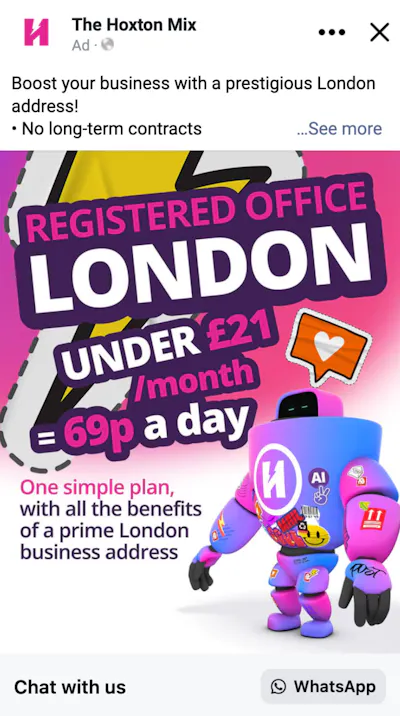
The more steps between an ad and a contact being able to get in touch creates friction, and that friction reduces conversion rates. Click-to-WhatsApp ads remove the steps between the ad and communication by allowing prospects to simply tap a button to send you a message.
When you create Click-to-WhatsApp Meta ads you can choose between four objectives:
- Driving traffic or engagement
- Generating leads
- Generating sales
- Building brand awareness
Unlike traditional lead conversion paths, this ad functionality allows you to start conversations with leads quickly after they first reach out, and research has shown that responding to an enquiry within five minutes makes you 21x more likely to qualify a lead. What’s more, a study by Lead Connect found that 78% of customers buy from the first company that responds to their inquiry.
4. Automated greetings & away messages
Small businesses can’t be expected to be on-hand 24/7 to answer customer enquiries. They simply don’t have the resources or the manpower to facilitate that level of customer service, so it’s understandable if you can’t respond immediately to messages sent outside of normal business hours. Unfortunately, this doesn’t mean that delayed responses won’t cost you leads.
Automated greetings
WhatsApp Business allows you to set up automated messages to provide immediate replies when a customer or potential customer starts a conversation with you:

Although they might not be able to explicitly answer the person’s enquiry, they can either sign post them to a resource that can help, or set expectations for when they might hear back from a real person. This can make a big difference to conversion rates compared to the contact receiving radio silence.
Quick Replies
Quick Replies are shortcuts that generate quick replies to common questions, and they also make it easier for business owners to manage conversations started out-of-hours, providing timely responses without the need for lengthy manual replies.
We've pulled together what that looks like in the image below

Away messages
If, like most small businesses, you're unable to provide 24/7 customer support, WhatsApp away messages are ideal for setting expectations as to when people will hear back from you.
You can find an example away message below:

You can schedule away messages for times you’re always unavailable, for example, evenings and weekends, or on an ad hoc basis, for example for family holidays.
5. Re-engage old customers
Generating new leads is important, but small businesses shouldn’t overlook the customers they’ve already won.
Not only do existing customers convert at a higher rate compared to new customers (60%-70% vs 5%-20%), but they also spend more. Existing customers have a 67% higher average order value than new ones.
This means that re-engaging these existing customers can be much more cost effective than investing all of your time into finding new prospects, and WhatsApp Business is great for encouraging them to buy again, provided you have permission to contact them through WhatsApp.
For example, through WhatsApp you can send relevant updates, offers or reminders to previous and existing customers. A hairdresser could use it to remind customers when they’re due for another appointment, while a retailer could let previous customers know about a new product launch it thinks they’d like. This is made easier by using Chat Labels to organise customers based on previous interactions, facilitating targeted messages instead of generic mass promotions.
Small businesses can also use WhatsApp to follow up with people who enquired but never purchased. Simply send these contacts a message asking whether they still need help or providing more information that could convert the lead into a customer.
Get your WhatsApp Business number
If you’ve already got a personal WhatsApp account connected to your mobile phone number, you’ll need a unique number for your WhatsApp Business account. But don’t worry, you’re not going to need a brand new phone to access all of the benefits of WhatsApp Business.
Here at Hoxton Mix we can provide you with a WhatsApp Business phone number in UK mobile 07xxx formats for just £4.99 per month, and it couldn’t be easier to get started.
Simply set up your subscription, download the app and we’ll do the rest. All you’ll have to do is verify your new number and configure your business profile.
FAQ
Can I connect WhatsApp Business to my CRM?
WhatsApp Business can be integrated with a number of popular CRM platforms, including HubSpot, Zoho, Salesforce and more. The exact technical setup of each integration will differ slightly depending on the CRM you use, but typically you’ll require access to the WhatsApp Business API, which can involve additional costs.
Do I need the WhatsApp Business API to generate leads?
No, many of the methods for generating leads with WhatsApp Business do not require access to the API. For example, automated greetings and away messages, your QR code and click-to-WhatsApp ads are all available via the free WhatsApp Business platform.
Do I need a separate phone number for WhatsApp Business?
Yes, if your personal mobile phone number is already connected to a WhatsApp account you’ll need a unique phone number. Fortunately, Hoxton Mix provides a WhatsApp-compatible virtual phone number for just £4.99 per month, and you can be up and running within minutes.
Hand-picked related articles



London
Virtual Office
Mail Management